Free on the App Store · iPhone

One home. One list. Every ecosystem.

Apple Home, Google Home, and SmartThings, finally in one app. Duplicates merge on their own. Live status, grouped by room. Built on 189 devices I bought and tested myself.

Download on the App Store See what’s free QR code linking to the App Store listing Scan to get the app
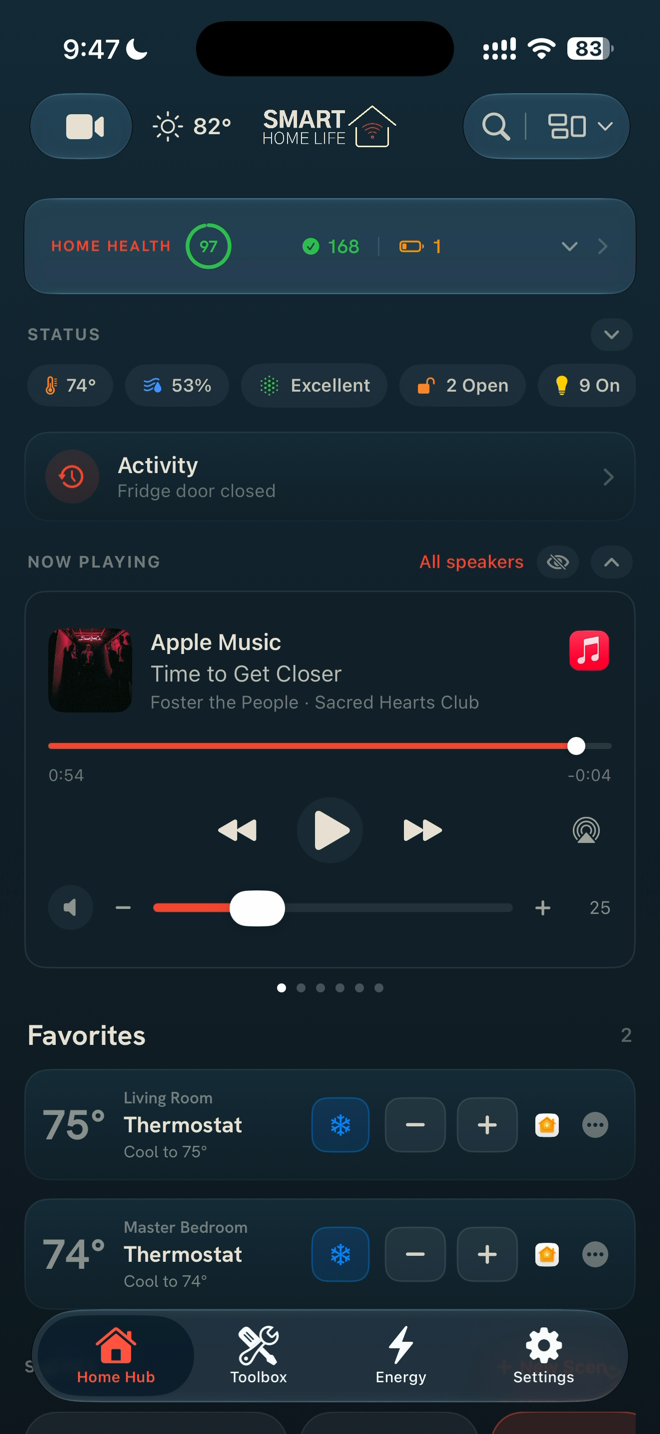
Home Hub dashboard showing every ecosystem's devices in one list
Hue Bridge offline · 12 min
Apple Home Google Home + SmartThings 156 + 151 devices. One list of the real uniques.
Flo: leak detected. Water valve closed.
189
devices tested
39
categories
40
curated automations
$0
gifted, ever

Every device bought with my own money. If it fails in my home, it leaves the list.

Version 3.0

Three apps each see a third of your home.

Apple Home sees the HomeKit gear. Google Home sees its own. SmartThings sees the rest. This app sees all of it: one deduped list, grouped by room, live status on every tile. On my own home it collapsed 156 Google devices and 151 HomeKit-bridged ones down to the real uniques.

One Home view merging Apple Home, Google Home, and SmartThings devices
Every ecosystem’s devices, one list. Duplicates merge automatically.
Organize Devices screen showing likely duplicate devices side by side
Not sure two entries are the same device? Organize Devices shows the likely twins. You pick where each one lives.
Free forever

Six tools. Free forever. No account.

Not trial-free. Not ad-supported-free. Free.

The Toolbox tab listing the free network tools
Thread NetworkFREE

Your Thread mesh, visualized. Invisible in every other consumer app.

Protocol BreakdownFREE

Every device sorted by how it actually connects. HomeKit, Wi‑Fi, Thread, Matter, Bluetooth.

Room PlannerFREE

Which rooms are covered. Which are not.

Device LifespanFREE

Know which devices are aging out before they fail.

ISP AlertsFREE

Is it your network or your provider? Know in seconds.

Pair VaultFREE

Every pairing code, behind Face ID. Factory reset without the panic.

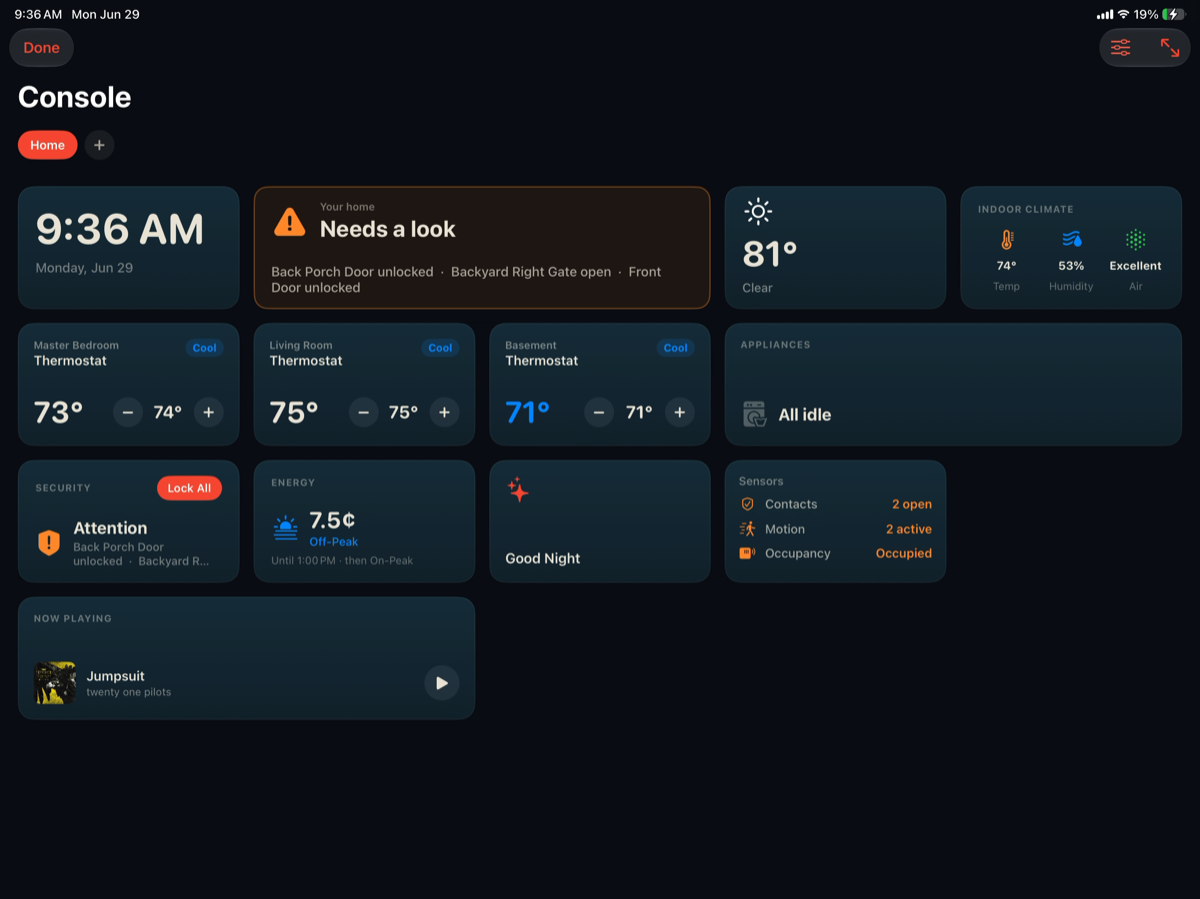
Open one app and know the state of everything.

A health score for the whole home, live temperature and humidity tiles, and every ecosystem’s devices with real product photos.

SmartThings devices shown inside the app with live status
SmartThings, Google, and HomeKit devices side by side.
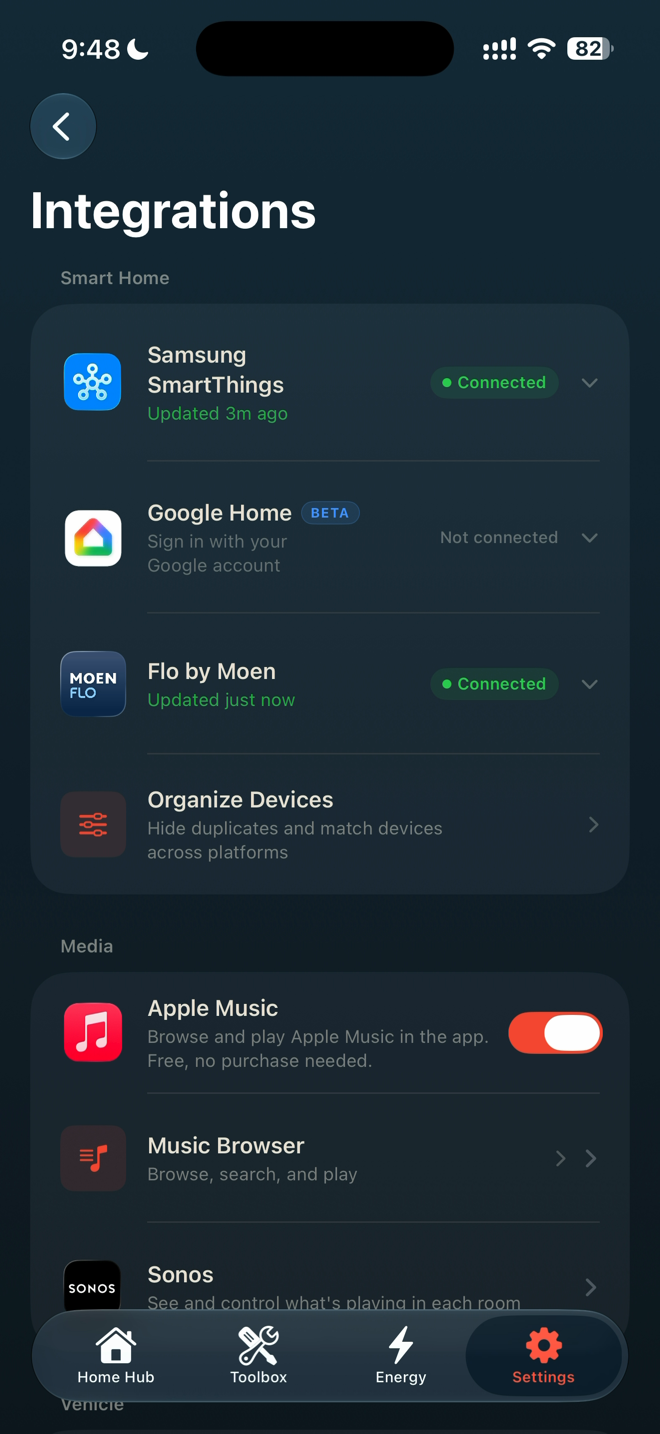
Integrations screen with SmartThings, Google Home, and Flo by Moen connected
Connect SmartThings, Google Home, and Flo by Moen in a tap.

Hub goes offline at 2am. You see it before coffee.

Home Watch keeps checking while the app is closed.

Offline alerts, in the backgroundA hub or sensor drops, your phone tells you. 24 hour, 7 day, and 30 day uptime for every device.
Battery and lifespan trackingLow batteries flagged before a sensor goes quiet, with the exact replacement linked.
Water, watchedFlo by Moen telemetry live on the dashboard: pressure, flow, and the valve. A leak alert can close the water from your phone.
Battery monitoring screen listing device battery levels
Every battery in the house, one screen.

When something breaks, see why instead of guessing.

The diagnostic layer your platform apps don’t have, plus 13 setup guides when you need a fix step by step.

Room Planner screen mapping device coverage by room
Coverage by room, so dead zones have nowhere to hide.
Pair Vault screen storing HomeKit and Matter pairing codes behind Face ID
Pairing codes saved before you peel the sticker off.

Runs on your iPhone.
No account. No data sold.

The scan happens on your phone and the results stay there. There is no login because there is no server holding your home. Nothing leaves your network unless you export it yourself.

Pay once. Own it forever.

No subscription. Nothing renews. Nothing expires.

Free forever
$0
no account, no ads
  • All six network tools
  • Home Hub dashboard, Apple Home
  • Automations and product library
  • Pair Vault code storage
Network Intelligence
$7.99
one time
  • Google Home + SmartThings join the one list
  • Full network scanner
  • Every device identified
  • Includes 10 setup guides
Home Watch
$2.99
one time
  • Background offline alerts
  • Uptime and battery
  • Includes 5 setup guides
Pair Vault Premium
$0.99
one time
  • QR regeneration + export
  • Includes 3 setup guides
Best value
All Tools Bundle
$9.99
one time
  • Everything above
  • All 13 setup guides

Every paid tool starts with a 7‑day free trial. In the App Store these show as Home Network Scan, Device Monitor, and Premium Vault. Same tools, same prices.

Why isn’t everything free?

The free tools cost me nothing to run, so they are free. The paid tools took months to build, and a one‑time purchase is what keeps them subscription‑free.

Who builds this

Hi, I’m Anthony. Smart Home Life is one person.

I bought all 189 devices in this app with my own money. Zero gifted. Zero paid. The app exists because my own smart home half‑worked and I got tired of guessing.

The full story

The questions I get most.

What does it work with?

Apple Home, Google Home, and SmartThings appear in the unified dashboard. Home Watch monitoring also covers gear like Sonos, Hue, Lutron, and eero on your network. Flo by Moen connects for live water telemetry and valve control.

What is free, and what is paid?

Six tools are free forever with no account: Thread Network, Protocol Breakdown, Room Planner, Device Lifespan, ISP Alerts, and Pair Vault. The Home Hub shows your Apple Home devices free; connecting Google Home and SmartThings into the one deduped list comes with Network Intelligence. Three power tools are one‑time purchases: Network Intelligence, Home Watch, and Pair Vault Premium. The bundle is $9.99 for everything, and every paid tool starts with a 7‑day free trial.

Is there a subscription?

No. Every purchase is one time and permanent. Each paid tool also starts with a 7‑day free trial, so you can try before paying anything.

What can the app see?

Only what your phone can already see on your own network, and it stays on the phone. No account, no server, no data sold. The privacy label on the App Store says the same thing.

What about refunds?

Purchases go through Apple, so refunds do too: report a problem at apple.com/support and Apple handles it directly.

Your smart home half‑works. It doesn’t have to.

Download on the App Store QR code linking to the App Store listing Scan to get the app
Get the app free